Sales App for MYOB AccountRight & MYOB Business
Give your outside sales team a mobile app to browse your catalogue, check stock, and write orders anywhere - even completely offline. Orders your reps take in the field flow automatically into MYOB - no re-keying, no delays.
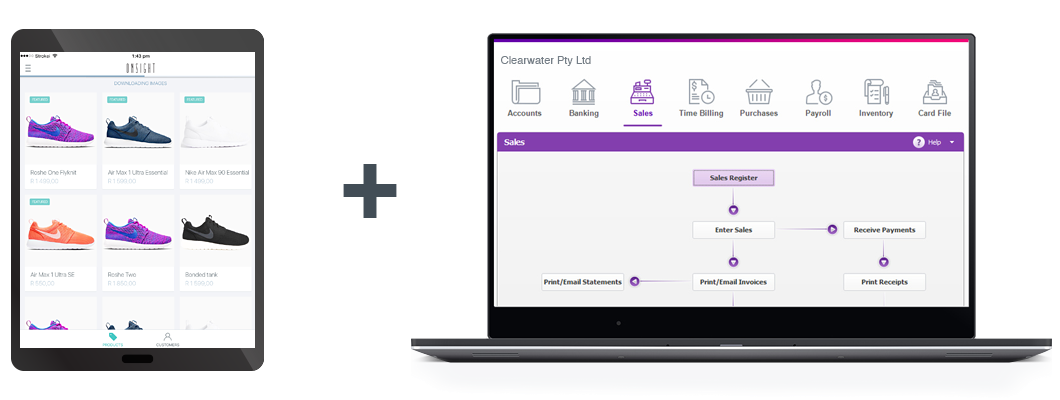
Mobile sales order entry for MYOB
Onsight helps outside sales teams capture orders quickly and accurately while visiting customers, attending trade shows, or working on the road. Sales reps can view customer information, browse a digital product catalogue with high-res images, create quotes, and place sales orders directly from their mobile device.
The app works offline, so reps can keep selling even when there is no internet connection. Once they are back online, orders sync automatically to MYOB ready for invoicing. It is the ideal order entry solution for Australian and New Zealand businesses already running on MYOB.

Why use Onsight as your sales app for MYOB?
When Onsight and MYOB are connected, your field sales team can take orders on the road while those orders are automatically pushed into MYOB. This eliminates duplicate data entry, reduces errors, and shortens the time from order capture to invoice.
Mobile Order Management
Create quotes and sales orders from a native mobile app on any iOS or Android device, whether you are at a customer's premises or on the trade show floor.
True Offline Capability
Work without a cellular signal or Wi-Fi. Orders are queued on the device and sync to MYOB automatically when connectivity returns.
Faster Invoicing
Field orders flow directly into MYOB - your accounts team can review and invoice without touching the original order data.
MYOB as Master Database
Keep MYOB as the single source of truth for customers, products and pricing. All changes in MYOB sync to Onsight automatically.
Always Accurate
Product names, prices, customer details and live stock levels in Onsight stay current with what is in MYOB, so reps always sell with up-to-date information.
Fewer Errors
Removing the manual handoff between field sales and your accounts team means less re-keying, fewer mistakes, and faster order processing.
Visual Selling
Equip reps with a professional digital catalogue with high-res product images and descriptions — far more effective than a printed price list.
How Onsight works with MYOB
From setup to invoicing, the entire workflow runs in just four steps.
Step 1
Connect
Authorise the connection between your Onsight account and your MYOB company file.
Step 2
Import
Your product catalogue, customer details, pricing and stock levels automatically sync from MYOB to Onsight.
Step 3
Sell
Your reps use the Onsight mobile app to browse products and write orders anywhere — online or completely offline.
Step 4
Invoice
Completed orders sync to MYOB, ready for your accounts team to review and send invoices to customers.
Take orders offline and sync them to MYOB
Sales does not always happen in places with reliable internet. Whether your reps are visiting customers in remote areas, working inside a warehouse, or exhibiting at a busy trade show, connectivity cannot be taken for granted. Onsight functions perfectly as an offline order taking app, letting reps carry on without interruption. They can access customer records, browse the product catalogue, and capture complete sales orders on the spot.
Once the device reconnects, Onsight handles everything behind the scenes. Orders flow directly into MYOB, significantly reducing the time from order capture to invoicing. For a step-by-step breakdown of how this works, read our guide on how to send orders to MYOB while offline.
Ready to start using Onsight with MYOB?
Already using MYOB to run your business? Start a free 30-day trial of Onsight today and activate the MYOB connector immediately after signing up. Your existing products, customers and pricing will sync across automatically, giving your field team a powerful mobile order entry tool from day one.
Start Your Free TrialNo credit card. No obligation.
Frequently asked questions
Which MYOB products does Onsight support?
For MYOB AccountRight, Onsight supports all editions — Basic, Standard, Plus and Premier — as long as your company file is stored online. A local company file is not supported. For MYOB Business, Onsight supports MYOB Business Pro. MYOB Business Lite is not supported because it does not include sales orders. MYOB Essentials is not supported because it does not include customer records, inventory tracking or sales orders.
Does Onsight work with MYOB?
Yes. Onsight has a native integration with both MYOB AccountRight and MYOB Business. Products, customers and stock levels sync from MYOB into Onsight, and orders and quotes created by your reps are automatically pushed back into MYOB for invoicing — no manual re-entry required.
Can sales reps create orders offline?
Yes. Onsight is built with an offline-first architecture. Reps can access customer records, browse the full product catalogue and write complete orders without any internet connection. The app queues all orders securely and syncs them to MYOB the moment the device comes back online.
Can Onsight send orders directly to MYOB?
Yes. Orders placed in Onsight sync into MYOB automatically. Your accounts team can then review and invoice without re-keying any data.
Is Onsight suitable for outside sales teams?
Yes. Onsight is purpose-built for outside sales reps, field agents, trade show exhibitors, and route distributors who need reliable mobile access to customer accounts, a visual product catalogue, live quote building, and fast order entry.
Can MYOB remain our master database?
Yes. MYOB remains the central source of truth for customer records, product information, pricing and stock on hand. Any changes you make in MYOB sync automatically to Onsight. Onsight-specific fields, such as catalogue categories are never overwritten by a MYOB sync.
How do I connect Onsight to MYOB?
Sign up for an Onsight account and email [email protected] to request activation of the MYOB connector. You will receive a link to authorise the connection, and once approved your products, customers and pricing will begin syncing automatically.
What data syncs between MYOB and Onsight?
Data flows in both directions. From MYOB into Onsight: products, pricing, stock levels, customer details, and tax codes. From Onsight back into MYOB: new customers created in the field, sales orders, and quotes.
How do orders and quotes appear in MYOB?
Sales orders from Onsight arrive in MYOB as sales orders. Quotes from Onsight arrive as MYOB quotes. Both can be reviewed and edited in MYOB before being converted to invoices.
Do stock levels stay up to date in the sales app?
Yes. MYOB holds two stock figures for each product: Quantity on Hand (physical stock) and Available (on hand plus stock on order minus committed to customers). By default, Onsight displays Quantity on Hand, but the integration can be configured to use the Available figure instead — or to show both. As invoices are processed in MYOB, the updated stock numbers sync back into Onsight, completing the loop between your field team and your accounting system.
Where should I manage product and customer information?
MYOB is the master database for core product fields (name, description, price, tax code, stock on hand) and core customer fields (company name, billing address, contact details). Changes made in MYOB sync automatically to Onsight. Onsight-specific fields, such as catalogue categories are managed in Onsight and are never overwritten by a MYOB sync.
Can sales reps see a customer's outstanding account balance?
Yes. Accounts receivable outstanding balances and overdue balances can be pulled from MYOB and displayed in the Onsight app, so reps know exactly what a customer owes — and whether any amount is overdue — before they write a new order. You can also have those balances printed on the order PDF that gets emailed to the customer.
Can Onsight use MYOB Item Price Levels for per-customer pricing?
Yes. Onsight can sync MYOB Item Price Levels so that each customer automatically sees their correct prices when a rep creates an order. An Onsight customer group is created for each MYOB Price Level, and pricing updates in MYOB flow through automatically. When a rep selects a customer to create an order, the correct price level prices are applied without any manual setup in Onsight.
Can Onsight automatically hide products that are out of stock?
Yes. When an item's stock drops to zero in MYOB, Onsight can automatically hide it from the sales app so reps cannot order it. When stock is replenished in MYOB, the product reappears automatically. Alternatively, rather than hiding it, Onsight can add an 'Out of Stock' label to the product name so reps can still see it but know not to promise it.
Can MYOB custom fields appear in the Onsight app?
Yes. MYOB products can have up to six custom fields — three custom text fields and three custom dropdown fields. All six can be synced to Onsight and displayed in the mobile app for reps and customers to view. This is useful for showing additional product specifications or internal codes that live in MYOB but need to be visible during a sales call.
Can the integration be customised?
Yes. Beyond the standard sync, a wide range of customisations are available: customer account balance and overdue balance display, MYOB Item Price Level sync for per-customer pricing, custom field mapping, automatic out-of-stock hiding, categories driven by MYOB custom fields, sales rep name on orders, line item sort order for warehouse packing, and tax-inclusive or tax-exclusive pricing mode. Contact us to discuss your specific requirements.
Get More Information on the Onsight–MYOB Integration
Already using MYOB? Tell us about your business and we'll show you how Onsight connects to your MYOB account for seamless mobile order entry.