Sales App for SAP Business One
Give your outside sales team a mobile app to check stock, apply customer price lists and write orders anywhere - even completely offline. Orders your reps capture in the field flow automatically into SAP Business One - no re-keying, no delays.
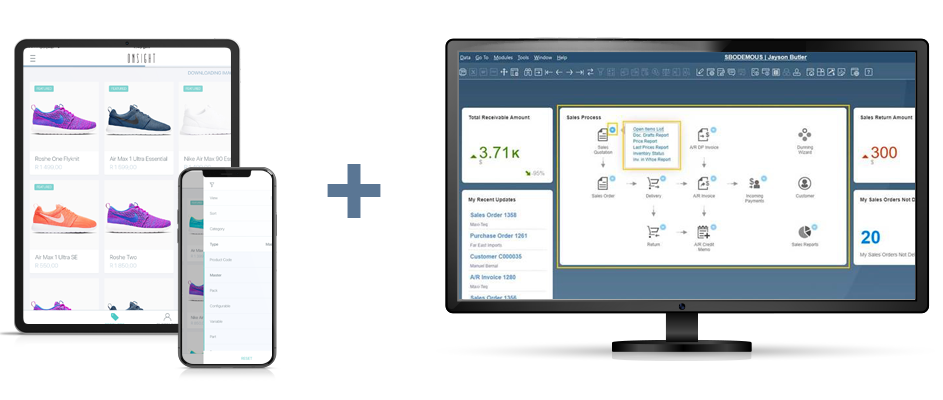
Mobile sales order entry for SAP Business One
Onsight connects directly to SAP Business One, giving your outside sales team a fast, intuitive mobile app to take orders in the field. Reps can view customer accounts, browse a rich digital product catalogue, create quotes, and submit sales orders — all from their phone or tablet.
The app works offline, so reps keep selling even without an internet connection. Once back online, orders sync automatically to SAP Business One for immediate processing and invoicing. It is the ideal order entry solution for distribution businesses already running on SAP B1.
Why use Onsight as your sales app for SAP Business One?
When Onsight and SAP Business One are connected, your field sales team can take orders on the road while those orders are automatically pushed into SAP B1. This eliminates manual order capture, speeds up your order processing cycle, and keeps your ERP data accurate.
Mobile Order Entry
Create quotes and sales orders from a native mobile app on any iOS or Android device — at a customer's site, a trade show, or anywhere in between.
True Offline Capability
Work without signal or Wi-Fi. Orders are queued on the device and sync to SAP Business One automatically once connectivity returns.
Immediate Processing
Field orders land directly in SAP Business One as sales orders, ready for your team to process and invoice without re-keying a single line.
SAP B1 as Master Database
SAP Business One remains the single source of truth for customers, products, pricing and stock. All changes in SAP B1 flow to Onsight automatically.
Always Accurate
Product names, prices, customer-specific pricing and live stock levels in Onsight stay in sync with SAP B1 so your reps always sell with the right information.
Fewer Errors
Removing the manual handoff between field sales and your back office means less re-keying, fewer mistakes, and a shorter order-to-invoice cycle.
Visual Selling
Equip reps with a professional digital catalogue featuring product images and descriptions — far more effective than a printed price list or spreadsheet.
How Onsight works with SAP Business One
From setup to order processing, the entire workflow runs in just four steps.
Step 1
Connect
Our team works with your SAP team to set up the connection between your Onsight account and your SAP Business One instance.
Step 2
Import
Your product catalogue, customer records, pricing and stock levels automatically sync from SAP B1 to Onsight.
Step 3
Sell
Your reps use the Onsight mobile app to browse products and write orders anywhere - online or completely offline.
Step 4
Process
Orders sync directly into SAP Business One as sales orders, ready for your back office team to process and invoice.
Take orders offline and sync them to SAP Business One
Sales does not always happen in places with reliable internet. Whether your reps are visiting customers in remote locations, working inside a large facility, or exhibiting at a busy trade show, connectivity cannot be taken for granted. Onsight functions perfectly as an offline order taking app, allowing reps to carry on without interruption. They can access customer records, browse the full product catalogue, and capture complete sales orders on the spot.
Once the device reconnects, Onsight handles everything automatically. Orders flow through to SAP Business One as sales orders, ready for your back office team to process immediately. This dramatically shortens the time between a rep writing an order and your warehouse being able to act on it.
What our SAP Business One clients are saying
“The integration of Onsight into our SAP system is one of the key strategic investments our business has made in the last few years and it is paying dividends.”

Distributors using SAP Business One and Onsight
See how real wholesale and distribution businesses use Onsight alongside SAP Business One to eliminate manual order entry and get field orders into their ERP immediately.

Kelly Hunter
Kelly Hunter is one of Ireland's leading wholesale distributors, supplying major retailers across the country since 2003 with brands including Ritter Sport. Kelly Hunter uses the Onsight mobile sales app to collect orders from their customers, which are then sent directly into their SAP Business One system for immediate invoicing.
Ready to start using Onsight with SAP Business One?
Already running your business on SAP Business One? Start a free 30-day trial of Onsight today. Once your account is set up, our team will work with you to connect Onsight to your SAP B1 instance and sync your products, customers and pricing automatically.
Start Your Free TrialNo credit card. No obligation.
Frequently asked questions
Does Onsight work with SAP Business One?
Yes. Onsight has a native integration with SAP Business One. Product and customer data syncs from SAP B1 into Onsight, and orders created by your reps are automatically pushed back into SAP Business One as sales orders — no manual re-entry required.
Can sales reps create orders offline?
Yes. Onsight is built with an offline-first architecture. Reps can access customer records, browse the full product catalogue and write complete orders without any internet connection. The app queues all orders securely and syncs them to SAP Business One the moment the device comes back online.
Can Onsight send orders directly into SAP Business One?
Yes. Orders placed in Onsight sync directly into SAP Business One as sales orders. Your back office team can then pick them up and process them for fulfilment and invoicing without any manual intervention.
Is Onsight suitable for outside sales teams using SAP Business One?
Yes. Onsight is purpose-built for outside sales reps, field agents, and route distributors who need mobile access to their ERP's customer accounts, product catalogue and pricing — without requiring a full SAP Business One licence on every device.
Can SAP Business One remain our master database?
Yes. SAP Business One remains the single source of truth for customer records, item master data, pricing and stock levels. Any changes made in SAP B1 sync automatically to Onsight. Onsight-specific fields, such as your product hierarchy, product availability and product custom fields, are managed in Onsight and are never overwritten by a SAP sync.
How do I connect Onsight to SAP Business One?
Sign up for an Onsight account and email [email protected] to get started. Our team will work with you to set up and configure the connector between Onsight and your SAP Business One instance. Once connected, your products, customers and pricing will begin syncing automatically.
What data syncs between SAP Business One and Onsight?
Data flows in both directions. From SAP Business One into Onsight: products, pricing, stock levels, customer details, and tax codes. From Onsight back into SAP Business One: new customers created in the field, sales orders, and quotes.
Do stock levels stay up to date in the sales app?
Yes. Stock on hand from SAP Business One syncs automatically to Onsight, so reps can see current availability when placing orders. As orders are processed and invoiced in SAP B1, the updated stock figures sync back into Onsight — completing the loop between your field team and your ERP.
Where should I manage product and customer information?
SAP Business One is the master database for core product fields (item name, description, price, tax code, stock on hand) and core customer fields (company name, billing address, contact details). Changes made in SAP B1 sync automatically to Onsight. Onsight-specific fields, such as catalogue categories, product availability and product custom fields, are managed in Onsight and are never overwritten by a SAP sync.
Can the integration be customised?
Yes. Beyond the standard sync, a range of customisations are available: customer-specific pricing from SAP B1 price lists, automatically hiding out-of-stock products, custom field mapping between SAP B1 and Onsight, and controlling the line item sort order for warehouse packing. Contact us to discuss your specific requirements.
Get More Information on the Onsight–SAP Business One Integration
Tell us about your SAP Business One setup and your field sales process. We'll help you scope the right integration for your business.